Key Takeaways
- EAT clipping is live. EAT says more than 100 creator clips already qualify, and the @wydeorg YouTube channel is posting them as "Everybody EATs." Shorts.
- Anyone can start, including someone who has never posted a video. A video qualifies when it fits one of EAT's four video levels and carries the "Everybody EATs." sticker.
- You do not need money to start. Level 1 is talking about hunger in the videos you already make, and restaurants can donate the food for bigger videos.
- Creators earn on the views of videos they submit, and clippers earn $1 for every 1,000 verified views on clips they make. The EAT app's creator release is next.
- GivingTuesday is December 1, 2026, 12 days away. This is the season to start.
Apply to the EAT creator fund →
EAT clipping is live. Clippers are now cutting EAT creator videos into short clips and posting them on their own accounts, and EAT says more than 100 of those clips already qualify for its $1 million Clipping Fund. The @wydeorg channel on YouTube is posting the work as "Everybody EATs." Shorts. This is the full guide for every creator who wants in: what to make, how to qualify, how to apply, how the money works, and how a video about feeding one person can travel further than anything else you post.
EAT clipping is live: watch the first Everybody EATs. Shorts
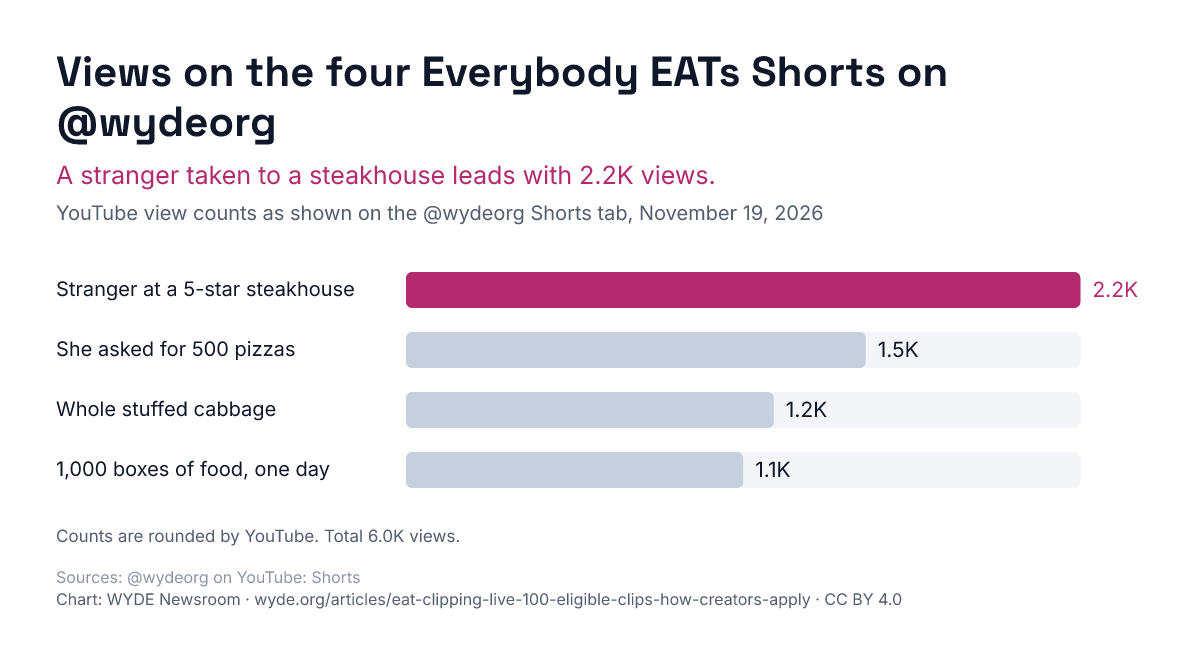
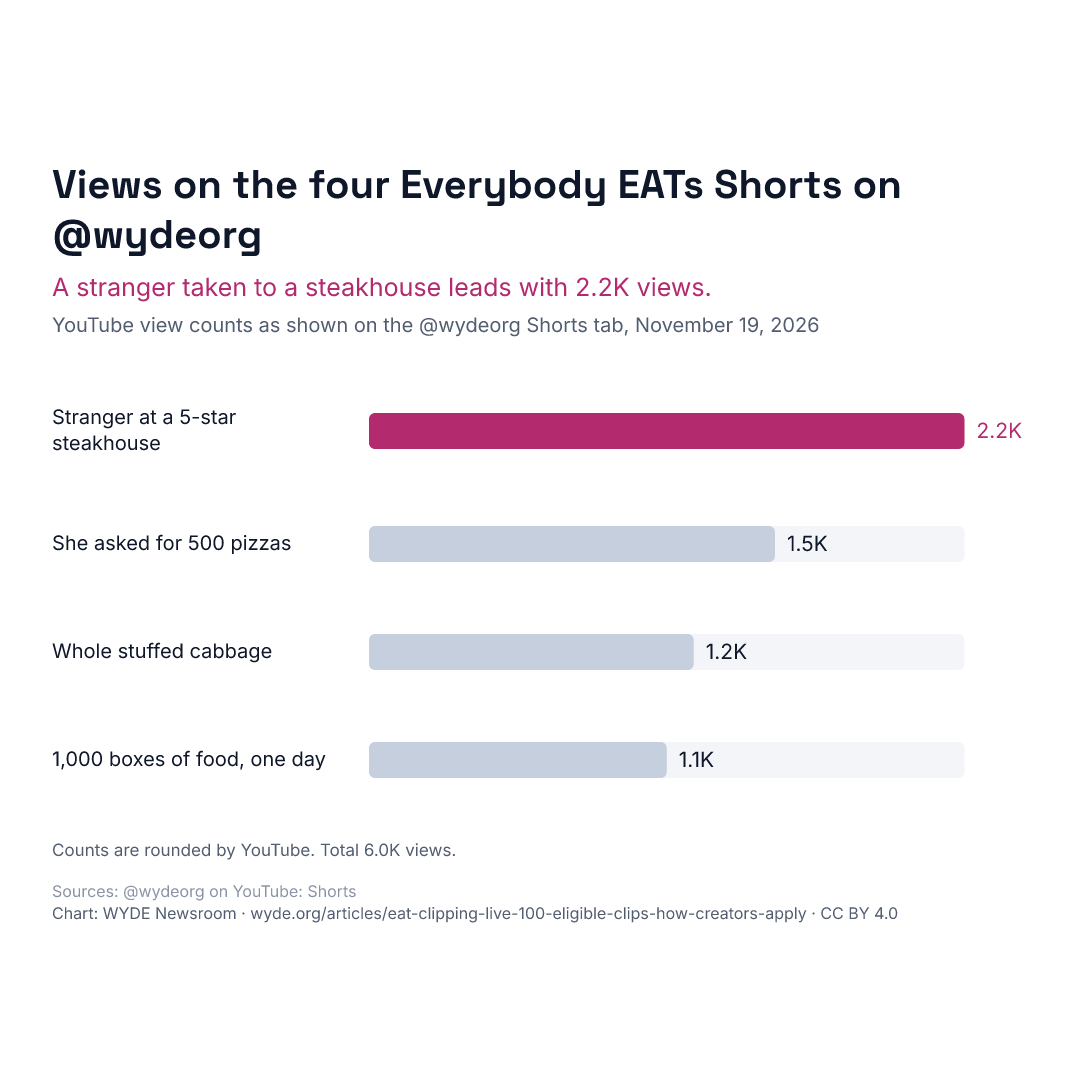
Four "Everybody EATs." Shorts sit at the top of the @wydeorg Shorts tab. On November 19, 2026, a stranger taken to a 5-star steakhouse had 2.2K views, a creator who asked for 500 pizzas had 1.5K, a whole stuffed cabbage made to feed more for less had 1.2K, and 1,000 boxes of food handed out in one day had 1.1K. Together that is about 6.0K views.
Use this chart
Free to republish under CC BY 4.0: credit WYDE Newsroom and link to this article. All WYDE charts.
Credit line
Embed code
Download the chart (PNG, 1200 by 653) · Square version for social posts (1080 by 1080)
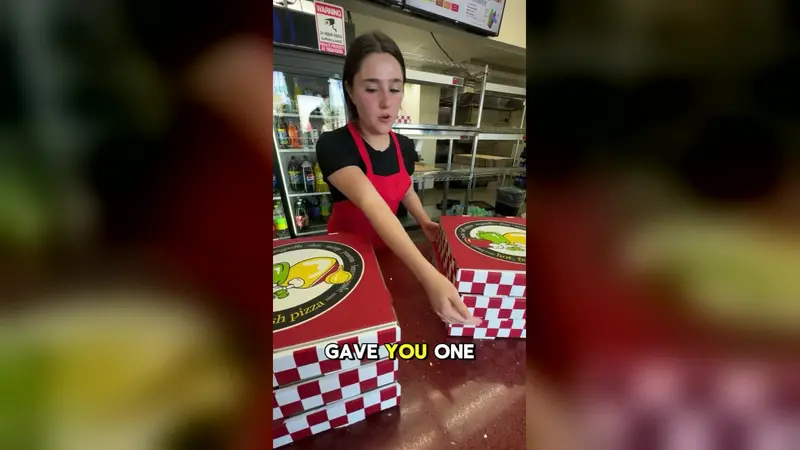
None of these needed a big budget. The most watched one is one person buying one stranger a meal. The pizza video started with a creator asking a pizzeria for 500 pizzas. The restaurant said yes to six, and six was enough for a skatepark. The size of the gesture matters less than the moment on camera.
What EAT is, in one minute
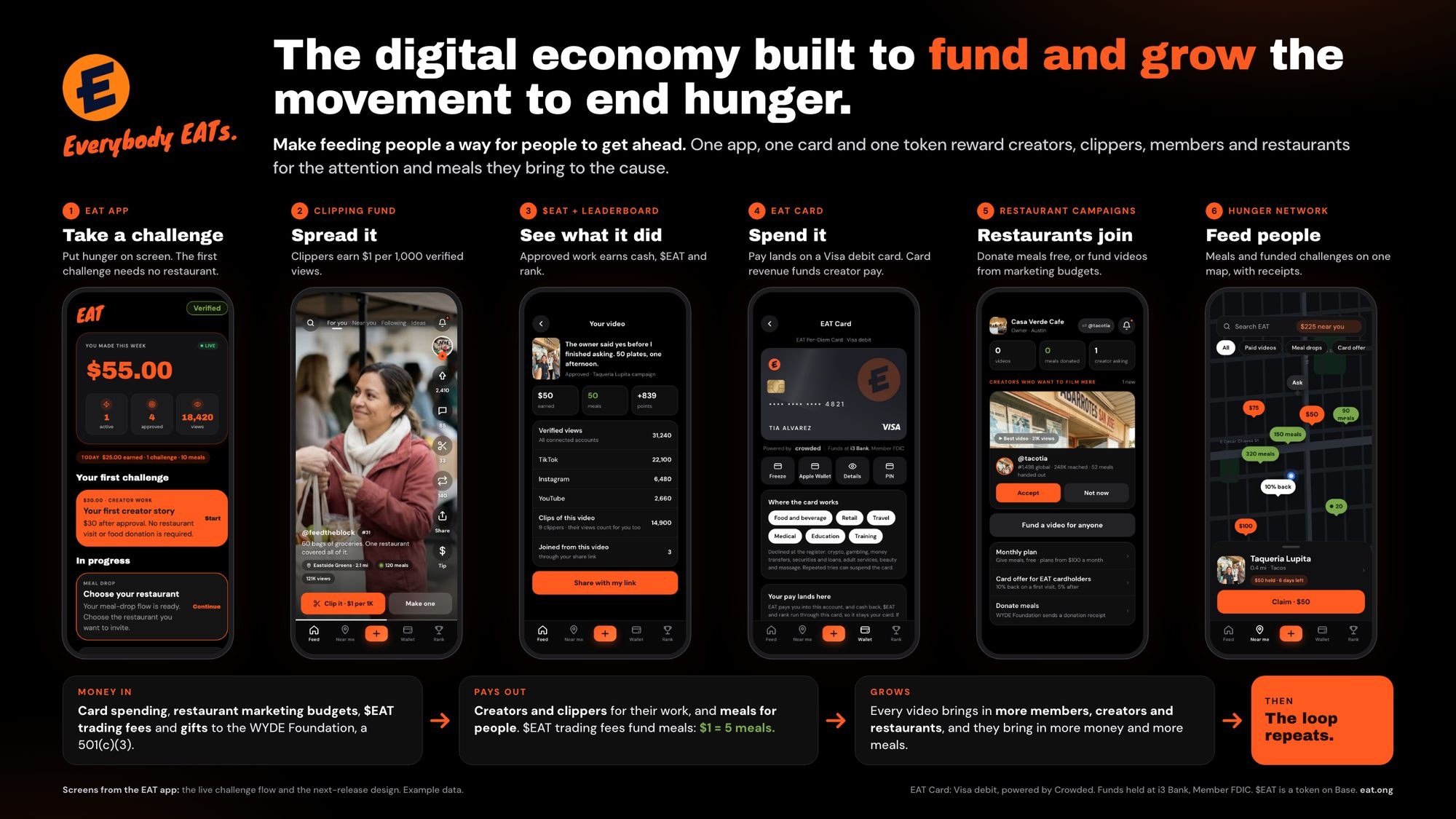
EAT is a network that pays people for the attention and meals they bring to ending hunger. Creators make videos. Clippers cut them into clips and spread them. Restaurants donate meals or fund videos. Every trade of the $EAT token carries a 1% fee split four equal ways, and one of those parts is a creator pool. The EAT app is where creators will film, add their frame, submit, track views and get paid, and its creator release is the next launch.
EAT's four video levels: pick your starting point
Every eligible video fits one of four levels, listed on fund.eat.ong. You do not need to feed anyone to start. Level 1 is the content you already make.
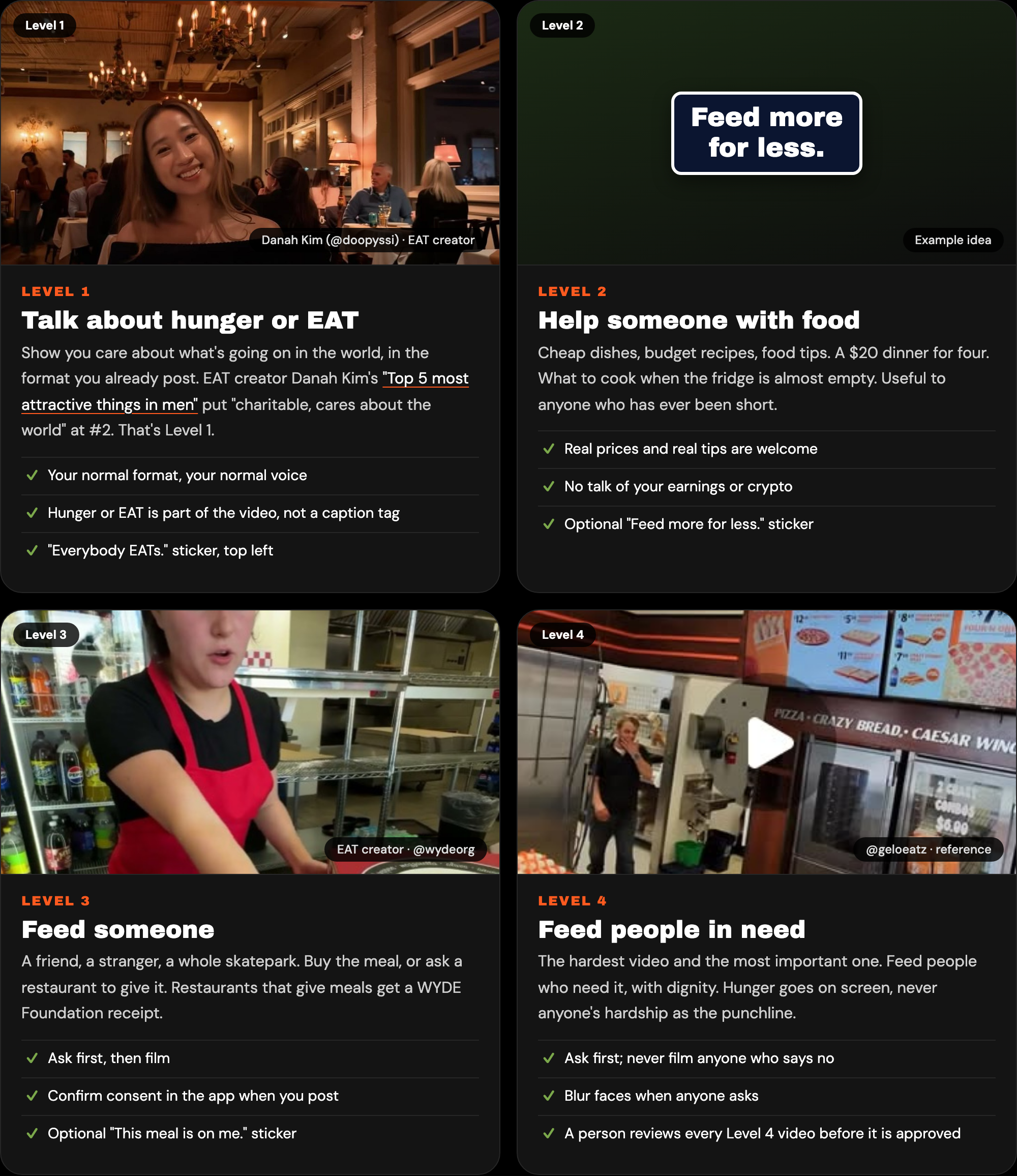
- Level 1, talk about hunger or EAT. Show you care about the world in your normal format. A Top 5 where "charitable" makes the list counts.
- Level 2, help someone with food. Cheap dishes, budget recipes and ways to feed more for less.
- Level 3, feed someone. A friend, a stranger or a whole skatepark. Ask first, then film.
- Level 4, feed people in need. Ask first, never film anyone who says no, and keep their dignity.
Formats that already work, according to fund.eat.ong: Top 5s, green flags and red flags, get ready with me, storytime, day in my life, POV, hot takes, street interviews, stitches and duets, what I'd do with $1M, food reviews, mukbang, taste tests, cook for a stranger, pay for their order, the restaurant ask, and meal handoffs, with care.
What never qualifies: crypto price talk, gambling, adult content, reposts of other people's videos, and anything that mocks people in need. Videos must be public. Private, subscriber-only and deleted posts do not count, according to the fund's terms.
The Everybody EATs sticker pack
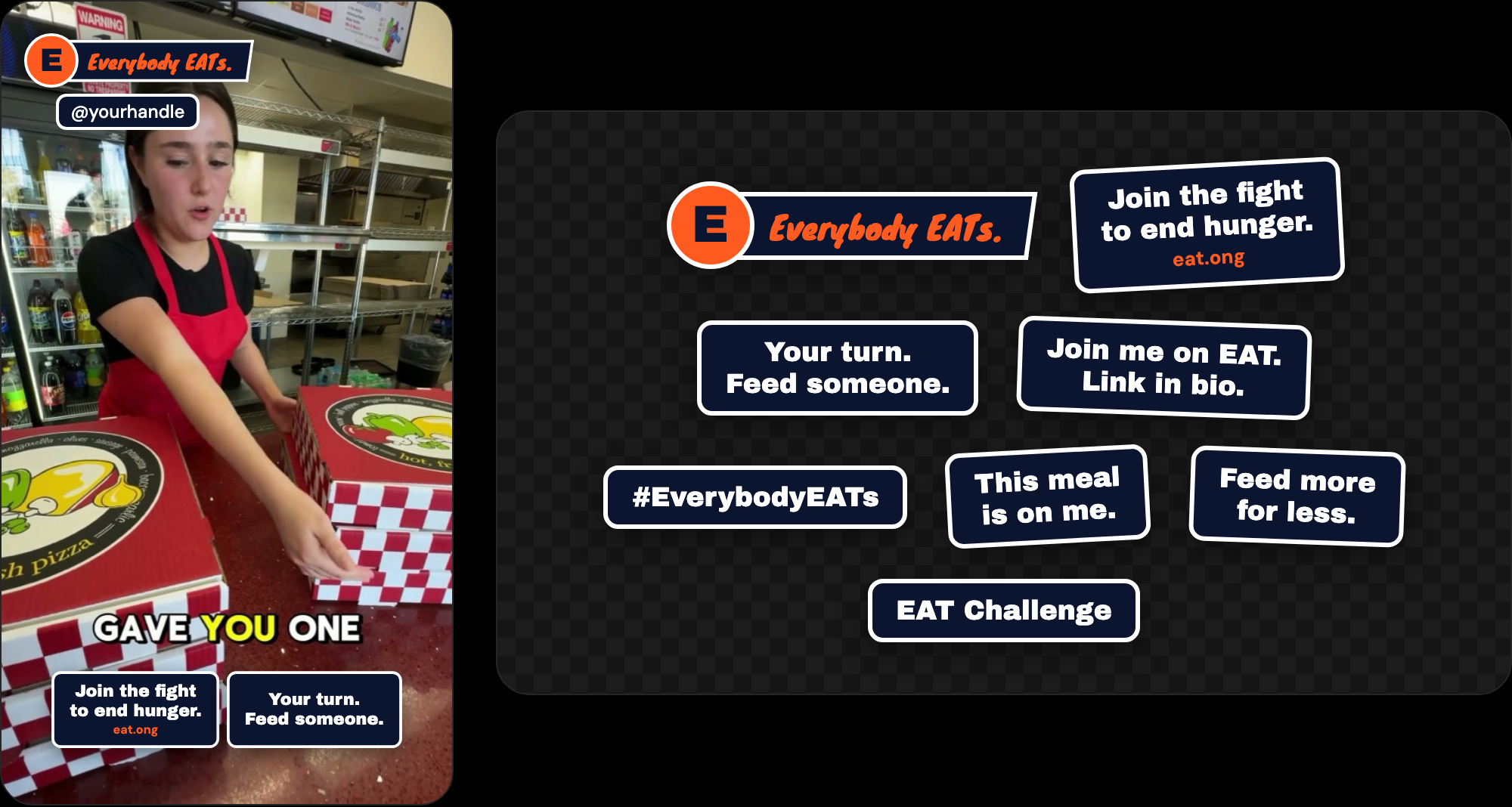
Every EAT video carries one required sticker, "Everybody EATs.", in the top left with your handle under it. It never moves. You can add up to two optional stickers side by side along the bottom, or none at all: "Join the fight to end hunger.", "Your turn. Feed someone.", "Join me on EAT. Link in bio.", "#EverybodyEATs", "This meal is on me.", "Feed more for less." and "EAT Challenge". In the EAT app, the frame is drawn onto your video for you, and the whole pack saves to your phone's photos for TikTok and Instagram posts.
How to apply to EAT clipping, step by step
- Apply at fund.eat.ong. The form takes about two minutes and is free. It asks for your name, handles, main platform, follower and view counts, location and up to three of your best videos. You must be 18 or older. You do not need the app to apply, and EAT reviews every application. Eligible creators hear back by email.
- Make one video that fits a level. Start with Level 1 or Level 2 if you are new.
- Say "Everybody EATs." and add the sticker. Post on TikTok, YouTube or Instagram, tag @wyde_eat and @wydeorg, and add #ad, as eat.ong lists.
- Send it in. While you wait, fund.eat.ong asks you to email one Level 1 video link to creators@eat.ong. With the app, you paste your post link into it, and your eat.ong/@ invite link goes in your bio.
The founding round closed on October 31, and those creators carry a Founding Creator badge. The form is still open for everyone else.
What if I don't have money to do this?
You do not need any. Level 1 costs nothing: it is the video you were going to make anyway, with hunger in it. Level 2 is a cheap dish or a budget recipe, often made from groceries you already buy. EAT's app design says the first challenge needs no restaurant.
For Level 3 and Level 4, ask a restaurant. Restaurants can donate meals for a creator to hand out on camera, and a restaurant that donates can claim a food donation receipt from the WYDE Foundation, a 501(c)(3) public charity, at foundation.wyde.org/receipt. The restaurant ask is a format on its own. Six free pizzas came from one ask. Restaurants can also fund videos from their marketing budgets. In the app's design, restaurants also see the creators who want to film there.
No one needs to buy $EAT to create or clip.
How creators and clippers get paid
Everyone earns on views. Clippers earn on the views of clips they make, at $1 for every 1,000 verified views on approved clips, from a $1 million fund. Creators earn on the views of videos they submit, and those videos can then be clipped, which brings more views. Pay comes in $EAT, in US dollars, or both, and it goes out through Stripe Connect or Airwallex depending on your country.
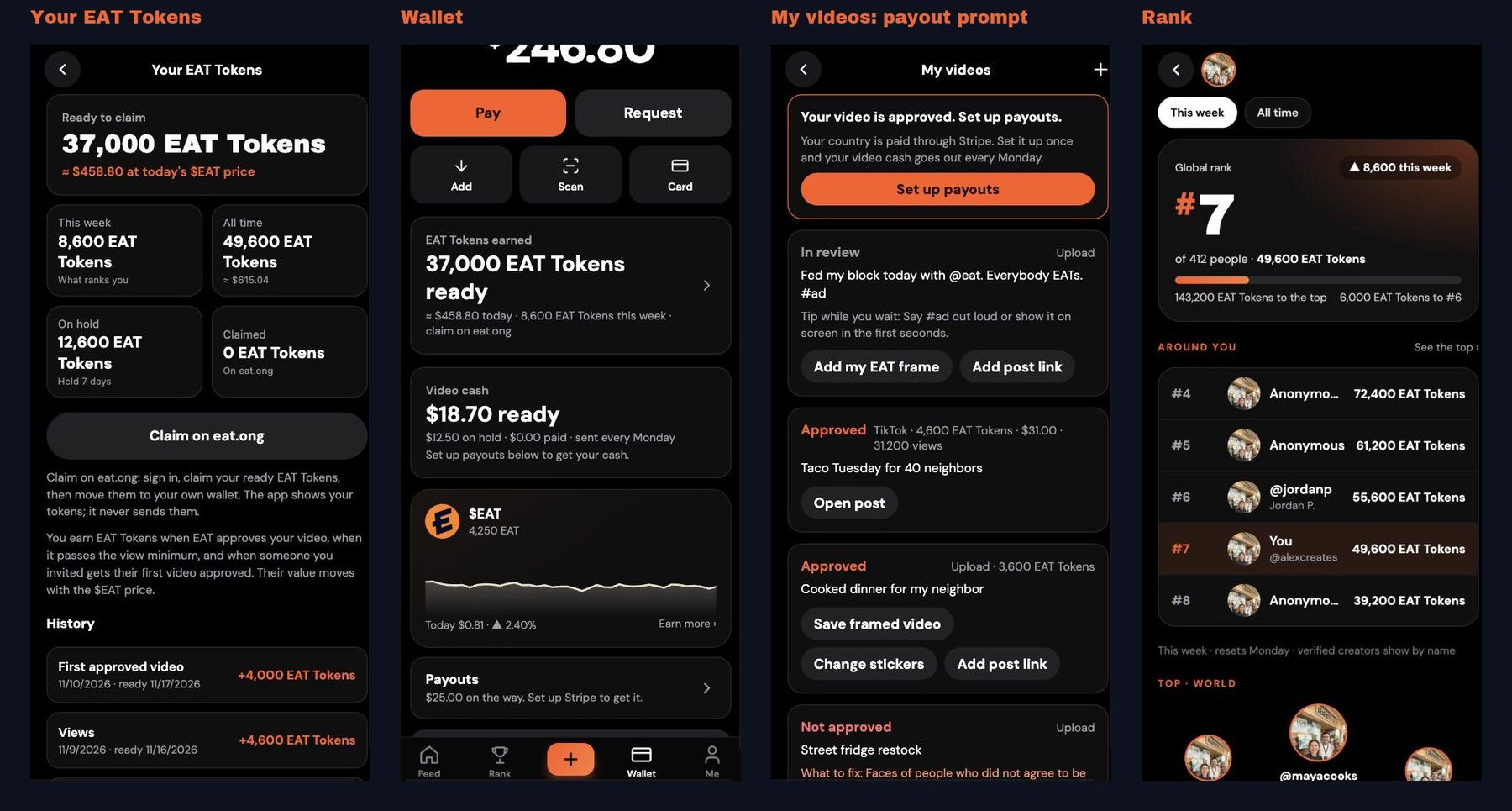
In the app, approved videos earn EAT Tokens, shown with their dollar value at the day's $EAT price. You earn when EAT approves your video, when it passes the view minimum, and when someone you invited gets their first video approved. Tokens are claimed on eat.ong, never inside the app. Fans can tip creators too.
EAT does not promise views, followers, earnings or meals. Creators are not paid for being clipped or for applying. Rates and rules are set by EAT and its terms, and they can change.
How your video travels: clips, rank and going viral
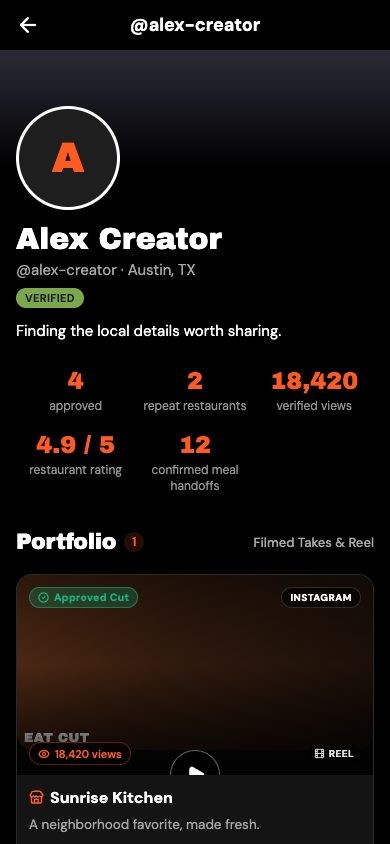
A normal post gets one shot at the feed. An EAT video gets many. Clippers cut it into short clips and post them on their own accounts, every clip credits you as the creator, and every clip is another chance to hit. The @wydeorg channel posts standout videos as Shorts. The app ranks creators every week, names verified creators on the board, and gives each creator a profile with approved videos, verified views and meal handoffs that restaurants can see.
What tends to travel: one clear ask in the first seconds, a real reaction, and a number people can repeat. "She asked for 500 pizzas" is a hook. "He took a stranger to a 5-star steakhouse" is a hook. Say #ad out loud or show it on screen early, as the app's own tip suggests.
Help someone first: the consent and dignity rules
The whole point is that someone eats. Ask before you film anyone. Never film a person who says no. Blur faces when someone does not agree to be shown. Get a parent or guardian's consent before showing a minor. A person reviews every Level 4 video before it is approved. A video that breaks these rules is not approved.
Why the season of giving is the moment to start
GivingTuesday falls on December 1, 2026, the Tuesday after Thanksgiving,. Videos of people sharing meals are what feeds will be full of, and every eligible video you make now can be clipped through the holidays. Clipping is live today. The app's creator release comes next, and EAT says a bigger announcement for creators is on the way. The creators already posting will be the ones it finds first.
People Also Ask
How do I apply for EAT clipping?
Apply at fund.eat.ong in about two minutes, for free, if you are 18 or older. Then post a video that fits one of EAT's four levels, say "Everybody EATs.", tag @wyde_eat and @wydeorg, add #ad, and email the link to creators@eat.ong.
Do I need followers or money to make EAT videos?
No. EAT judges each video against its four video levels, not the size of the account. Level 1 is talking about hunger in your normal content and costs nothing, and restaurants can donate the food for bigger videos.
How do EAT creators get paid?
EAT creators earn on the views of videos they submit, in $EAT, US dollars or both, paid through Stripe Connect or Airwallex by country. In the EAT app, approved videos earn EAT Tokens, which are claimed on eat.ong.
How much does the EAT Clipping Fund pay clippers?
The EAT Clipping Fund pays clippers $1 for every 1,000 verified views on approved clips, from a $1 million fund.
What sticker goes on an EAT video?
Every EAT video carries the "Everybody EATs." sticker in the top left with the creator's handle. Up to two optional stickers from the EAT sticker pack, such as "Your turn. Feed someone.", can go along the bottom.
Sources: fund.eat.ong, fund.eat.ong/terms, eat.ong, @wydeorg on YouTube, WYDE Foundation, GivingTuesday.